Ved: Recure Tools Hub
PC specs and a socket planner you can fill during a demo run.
Not every Ved: Recure question is a story question. Some of them are “will this laptop boot the demo” and “what do I socket before Amplifier.” This hub holds the practical pages: system requirements, the build planner, and difficulty and camera.
The game is a Windows Steam title. Steam lists full controller support, achievements, cloud saves, and leaderboards. There is no Roblox port, no mobile client in the store file, and no cooperative-play toggle. If a tool on this site ever looks like a code redeemer, it is in the wrong wiki.
What to open first
- Buying a GPU or checking a laptop — system requirements. Minimum GTX 1060 / 4 GB RAM / 12 GB disk; recommended GTX 1660 / 8 GB RAM. DirectX 11, Windows 10, Intel i5-class CPU.
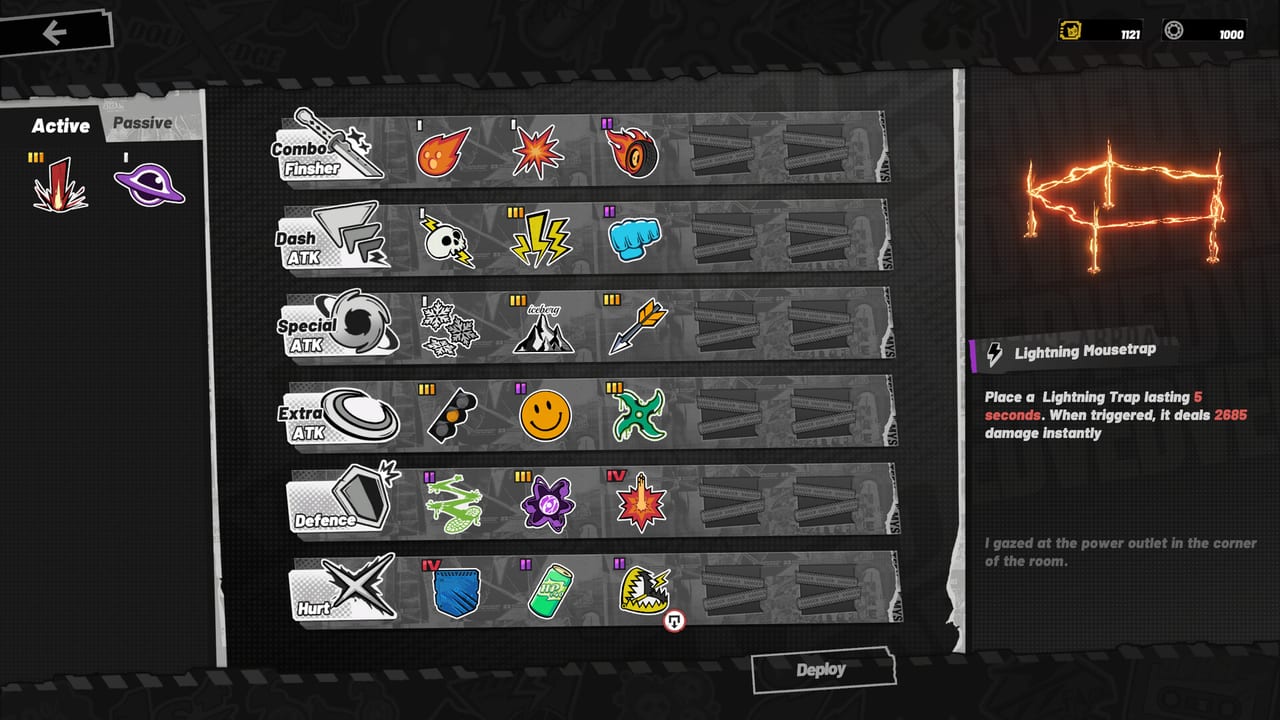
- Sitting in a draft screen — build planner. Print the socket table (Combo Finisher, Dash ATK, Special ATK, Extra ATK, Defence, Hurt) and write card names into rows.
- Camera making you sick, or Chapter 1 feeling like a wall — difficulty and camera. Shake 0, fixed camera, then the June difficulty slider.
- Still learning verbs — leave this hub and read combat plus buff chains.
Why a “planner” is a table, not a cheat engine
Ved: Recure’s builder is already an in-game UI with Deploy, Active/Passive tabs, and a Refresh button. We are not going to ship a fake optimizer that pretends 150+ unpublished cards have weights. The planner is a checklist so you do not leave Defence empty. That is the entire feature, and it is the one the demo does not force you to notice.
If you want live numbers, use the in-game property panel (Plumy’s Attack 60 / HP 1800 sheet) and the damage figures printed on cards (708 martyr, 2685 trap). This wiki will not scrape a private API.
Festival-session kit
When a demo window is open:
- Confirm specs on the requirements page.
- Set V-Sync, try fixed camera, drop shake to 0 — notes in getting started.
- Fill the planner’s Defence row before room 4.
- After a Chapter 1 clear, add Fei to the planner’s “who I am actually playing” line. Unlock steps: Fei.
- If Rush is the goal, copy a greedy chain into the planner’s Rush column and keep a budget chain in the Chapter 1 column. They are not the same.
When a demo window is closed, the tools hub is still useful: you can confirm the GTX 1060 floor and read launch timing on the 21 Sep 2026 page without guessing.
What we will not add
- Gift-code boxes. This is not a live-service Roblox title.
- Script injectors. Single-player Steam + anticheat is not our problem to “solve.”
- Damage simulators that invent Frostelle coefficients.
If SummerClip later ships an official builder or a public card API, this hub will link it from official links. Until then, the honest tools are specs plus a socket table.
For ranks that tell you which card to write into the table, use the buff tier list. For who holds the gun versus the slash, use the character tier list. Then come back here and write the names in the correct row.
Frequently Asked Questions
Quick answers to the most common questions.
Does Ved: Recure run on Steam Deck?
Steam listed Deck compatibility as unknown at snapshot time. Use Windows specs as the floor and check Proton reports yourself. Details on system requirements.
Is there an in-wiki damage calculator?
No. Card text already prints 708 and 2685. The build planner tracks sockets, not formulas.
Will you add a codes tool after launch?
Only if SummerClip actually ships redeemable codes. The current store file is a buy-to-play action roguelite, not a code game.